Add pick points and brace points
Place the lifting inserts (pick points) that raise the panel and the brace points that hold it while it is set.
Pick points are the lifting-insert locations a crane rigs to when tilting the panel up to vertical. Brace points are where the temporary braces attach to hold the panel plumb after it is set. Both are laid out as a grid of positions across the panel face.
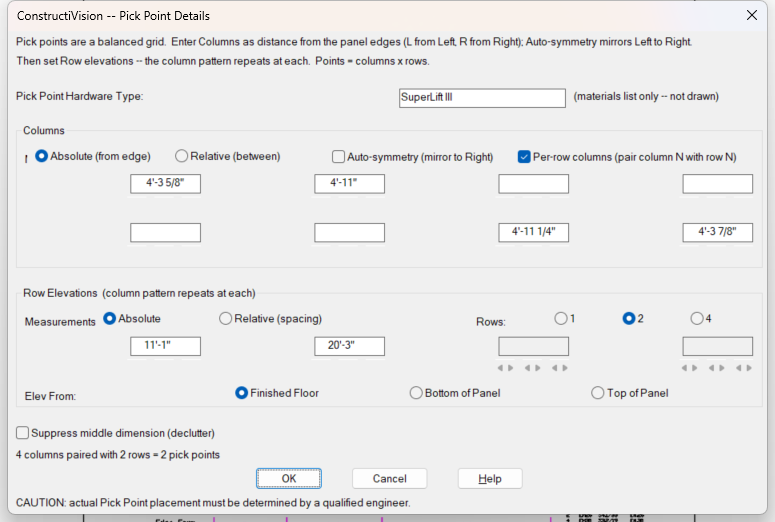
The Pick Point Details dialog; Brace Points uses the same layout.
Add pick points
Open Main Panel Details for the panel.
Open Pick Point Details.
Define the Columns — the across-panel positions:
Choose Absolute (from edge) to give each column’s distance from the panel edge, or Relative (between) to space the columns evenly.
Turn on Auto-symmetry (mirror to Right) to enter only the left half — ConstructiVision mirrors it to the right, keeping the lift balanced.
Pick the column count (2, 4, …).
Define the Row Elevations — the up-the-panel positions. The column pattern repeats at each row. Enter rows as Absolute heights or a Relative (spacing), measured from Finished Floor, Bottom of Panel, or Top of Panel.
(Optional) Turn on Suppress middle dimension (declutter) to drop the redundant center dimension on a symmetric layout.
Confirm and redraw. Each pick point is drawn as a lifting insert at its grid position and dimensioned.
Add brace points
Open Main Panel Details, then Brace Point Details.
For each Row, set its position: T (top) / B (bottom) for where it sits up the panel, and L / R for which side.
Add as many rows as the panel needs.
Confirm and redraw. Each brace point is drawn and dimensioned.
Notes
Auto-symmetry keeps the lift balanced — enter the left columns and let ConstructiVision mirror them to the right, rather than positioning each side by hand.
Pick-point count and capacity are the lift engineer’s call (2, 4, 8, … per the panel’s weight and rigging). ConstructiVision draws the layout you specify; it does not size the inserts.
Pick and brace points are cast-in hardware — see embed and lifting insert in Project Glossary, and Lifting and Rigging Details for the engineering behind them.