Generate a materials list
Produce the quantity take-off for a panel, written as a spreadsheet-ready file next to the drawing.
A materials list is the quantity take-off ConstructiVision counts from a panel — the embeds, lifting and bracing hardware, fasteners, and concrete quantities a panel actually carries. The count is taken from the drawn panel, not from the dialog settings alone: what you see on the drawing is what gets counted, so the list always matches the drawing you issue.
Steps
Open the panel drawing.
Make sure the panel has been drawn (the normal edit → OK → redraw flow does this). A panel that has been configured in the dialogs but never drawn has nothing to count yet — the command will tell you so.
From the CV menu, choose Materials List. (The Program Options hub carries the same command as its Print Materials List button, enabled once a drawing is open.)
A progress dialog runs through the collating steps, then the command window reports how many material types were counted.
Open
matlist.csv— it is written next to the panel drawing, in the same folder. It opens directly in Excel or any spreadsheet.
What is counted
Quantities are tallied from the components placed on the drawn panel:
Material |
Counted from |
Quantity |
|---|---|---|
Weld connections |
Each embed on the panel, resolved to its full name in the project’s component catalog |
each |
Pick points |
Each lifting insert, grouped by insert size |
each |
Brace points |
Each brace insert, grouped by insert size |
each |
J bolts |
Each anchor bolt, grouped by bolt size |
each |
Area |
The panel’s finished (net) face area, from the panel’s computed engineering values |
sq ft |
Cubic yards |
The panel’s true concrete volume — openings and recesses already deducted |
cu yd |
An embed whose type is missing from the project’s component catalog is still counted, flagged
(not in catalog) rather than silently renamed — the list never hides a component it cannot
identify.
A pick point placed above the panel top carries no insert size, so it is tallied on its own
TOP_PICK row under Pick Points rather than being folded into a sized group.
Where the J-bolt count comes from
J bolts are counted from the cast-in bolts that remain on the drawn panel as discrete hardware pieces — for example a top plate’s anchor-bolt array. A wood ledger or top-plate bar draws its bolt array as tick marks on the bar instead, with the bolt spec and spacing carried on the bar’s call-out; those arrays are not yet totaled per piece on a single-panel drawing.
The output file
matlist.csv is a plain CSV with the header row Category,Material,Quantity,Unit. Each material
lands in a report category — Panel Specifications, Weld Connections, Pick Points, Brace
Points, Fasteners, and so on — so the file sorts and pivots cleanly in a spreadsheet.
Running it across a project
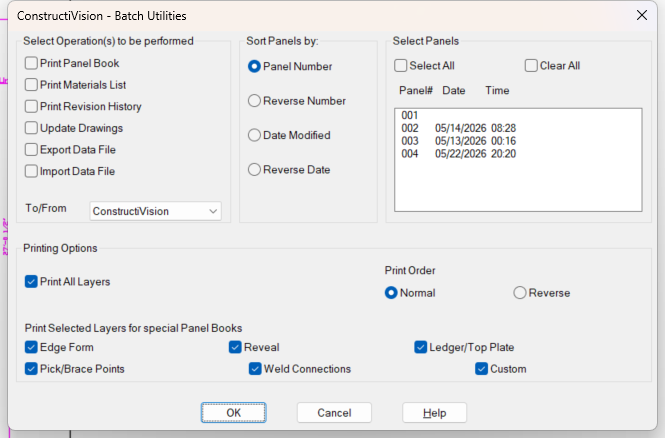
The Batch Utilities dialog carries the Print Materials List operation for whole-project runs.
Batch Utilities lists a Print Materials List operation alongside Print Panel Book and Print Revision History.
Project-wide totals are on the way
In the current build, the materials list generates per panel drawing — open each panel and run
Materials List. The Batch Utilities operation that tallies one combined list across a selected
set of panels is being reconnected and is not yet functional; selecting it does not produce a
materials list. Until it lands, the per-panel matlist.csv files are the accurate source, and they
combine cleanly in a spreadsheet.
Lineal-footage items are coming to the single-panel count
Per-piece hardware — connections, pick and brace points, bolts — plus area and concrete volume are counted today. The lineal-footage form items (chamfer strip, reveal strip, edge form, treated lumber, and brace extensions) are not yet totaled on a single-panel drawing; the command prints a note listing exactly which items are pending rather than guessing a quantity.
Notes
Draw first, count second. The count reads the drawn panel. If the panel is configured but not yet drawn, the command says so and asks you to run Draw Panel first; if nothing has been configured at all, it says that instead — the two messages are distinct, so a blank template is never mistaken for lost data.
Redraw after edits. Because quantities come from the drawing, regenerate the panel after changing it, then rerun Materials List — the list is rebuilt from scratch each run, so it never accumulates stale rows.
Connection names come from the project catalog. The same component list that drives the Weld Connections dialog (Add weld connections) supplies the full material names, so the take-off and the panel book name every embed identically.
No plot style needed. The materials list is a data file, not a plotted sheet — nothing is sent to the printer.